













How to Clean Your Laptop Safely: Screen, Keyboard, Lid (With or Without a Skin) — Capes
In this guide
Quick answer: Shut the laptop down and unplug it. Wipe the screen with a dry microfibre cloth, then with the cloth lightly dampened with water; for stubborn smudges, use a cloth lightly moistened with 70% isopropyl alcohol. Never spray anything directly on the laptop, keep liquid out of ports and vents, and avoid window cleaner, ammonia, bleach and abrasives.
Cleaning a laptop is simple, but the wrong cleaner can strip a screen coating or push liquid into the keyboard. The steps below follow the guidance laptop makers publish, with one extra section for laptops that wear a skin.
What do you need to clean a laptop?
Two soft microfibre cloths, a little water, and 70% isopropyl alcohol for stubborn marks. A can of compressed air or a soft brush helps with the keyboard and vents.
| Part | Use | Avoid |
|---|---|---|
| Screen | Dry microfibre, then a cloth lightly dampened with water; 70% isopropyl alcohol on the cloth for stubborn smudges | Window or glass cleaner, ammonia, household sprays, paper towels, pressing hard |
| Keyboard | Tilt and tap out crumbs, compressed air at an angle, cloth lightly dampened with 70% isopropyl alcohol | Pulling keys off, liquid dripping between keys |
| Trackpad and palm rest | Cloth lightly dampened with water or 70% isopropyl alcohol | Abrasive pads, bleach |
| Lid and base | Dry microfibre, then a lightly damp cloth | Solvents, scouring sponges, polishing pastes |
| Vents and ports | Short bursts of compressed air, soft dry brush | Liquids, pins or toothpicks pushed inside |
How do you clean a laptop screen without damaging it?
Dry first, damp second, and alcohol only if needed. Most screens have coatings that harsh cleaners can damage.
- Shut down and unplug the laptop. A black screen also shows the dirt better.
- Wipe gently with a dry microfibre cloth to lift dust, so you do not rub grit across the screen.
- Lightly dampen a clean part of the cloth with water and wipe in straight lines. It should be damp, not wet.
- For marks that stay, use a cloth lightly moistened with 70% isopropyl alcohol.
- Dry with a dry part of the cloth and leave the lid open for a few minutes before closing it.
If your MacBook has a nano-texture display, follow Apple's separate instructions for that screen. Apple says not to use window cleaners, household cleaners, aerosol sprays, solvents, ammonia or abrasives on displays.
How do you clean a laptop keyboard and trackpad?
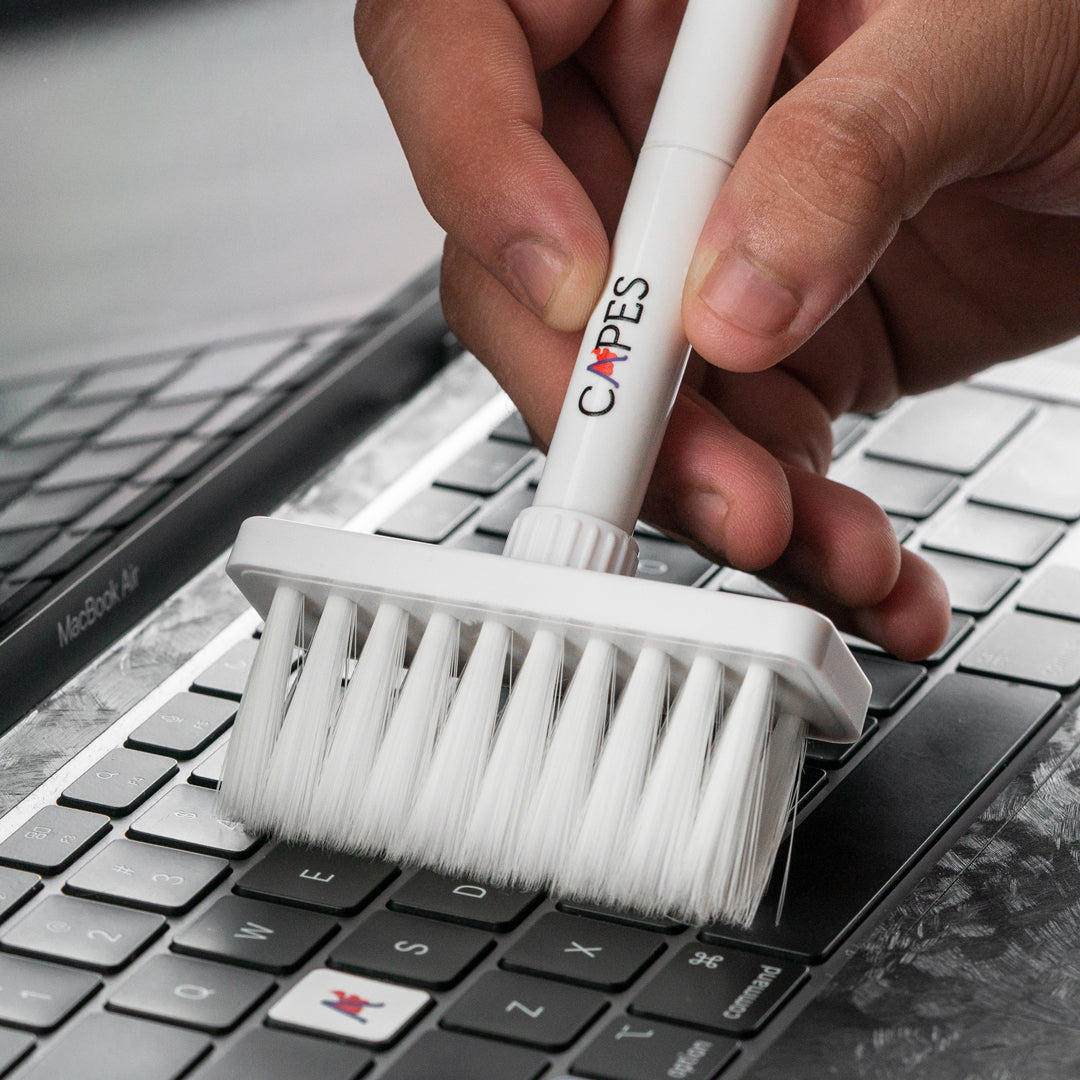
Get the crumbs out first, then wipe the keys with a barely damp cloth. Do not pull keys off; on most laptops they are not designed to be removed.
- With the laptop off, tilt it on its side and tap gently to let loose crumbs fall out.
- Blow between the keys with short bursts of compressed air, holding the can at an angle.
- Wipe the keys and trackpad with a microfibre cloth lightly dampened with 70% isopropyl alcohol. Go gently over printed letters.
- Dry with a clean part of the cloth.
Spilled something? Switch the laptop off straight away, unplug it, and get it checked at a service centre. Do not try to dry the inside with a hair dryer.
How do you clean the lid, base and vents?
Wipe the outside with a dry, then lightly damp, cloth and clear the vents with air. Do not open the laptop yourself to clean the fans unless the manufacturer's guide says you can.
- Lid and base: dry microfibre first, then a lightly damp cloth. For sticky marks, a cloth lightly moistened with 70% isopropyl alcohol.
- Vents: short bursts of compressed air from outside, with the laptop off. Dust inside the fans is a job for a service centre.
- Ports: a soft dry brush or a puff of air. Never metal pins.
How do you clean a laptop with a skin on it?
The same way, with two extra rules: be gentle at the edges, and keep solvents to a minimum. Edges and corners are where a skin can start to lift, so that is where rubbing and liquid do the most harm.
- Wipe the skin with a soft cloth lightly dampened with water, moving from the centre towards the edges rather than against them.
- For sticky marks, a barely damp cloth with a small amount of isopropyl alcohol is fine on the surface; do not soak the edges.
- Skip abrasive cleaners, scouring sponges and polishes. They dull matte and textured finishes.
- Keep the laptop out of long, direct sunlight to help the finish keep its colour.
- If a corner starts to lift, press it down firmly with a clean finger. Do not add glue.
Cleaning around the skin is also a good moment to check the vent cut-outs are clear of dust.
How often should you clean a laptop?
Wipe the screen, keyboard and palm rest whenever they look dirty, and more often if you eat near the laptop or share it. Check the vents for dust every few months, and sooner if the fans sound louder than usual.
A quick dry wipe before you pack the laptop also stops grit scratching the lid in your bag; our guide on protecting a laptop from scratches covers the rest.
Keep your laptop looking new
A skin cuts down on cleaning: it hides fingerprints and takes the scratches instead of the lid. Find your model in laptop skins or MacBook skins.
Outside India? Shop on capes.co.
FAQ
Can I clean my laptop screen with isopropyl alcohol?
Yes, for stubborn smudges: use a soft cloth lightly moistened with 70% isopropyl alcohol and wipe gently. Never spray it on the screen, and check your laptop maker's guide if your screen has a special coating.
Can I clean a laptop screen with water?
Yes. A microfibre cloth lightly dampened with water is the first thing to try. Wring it out so it is damp, not wet, and never pour or spray water on the laptop.
Can I use glass cleaner or hand sanitiser on a laptop screen?
No. Window and glass cleaners can contain ammonia or other chemicals that damage screen coatings, and sanitiser gels contain additives that smear. Use water or 70% isopropyl alcohol on a cloth instead.
Can I use wet wipes on a laptop?
Only wipes made for screens or plain 70% isopropyl alcohol wipes, used gently and never dripping. Baby wipes and household wipes can leave residue or contain cleaners that harm coatings.
Laptop screen kaise saaf kare?
Laptop band karke charger nikaliye. Pehle sookhe microfibre kapde se ponchiye, phir kapde ko halka sa paani se geela karke ponchiye. Zid daag ke liye kapde par thoda 70% isopropyl alcohol lagaiye. Screen par seedha spray mat kijiye.
Written by Capes, makers of precision-cut skins for laptops, phones and cameras since 2017. Last checked: 9 October 2026.
 5-in-1 Tech Cleaner
 MacBook Air 13 M5 2026 Skins & Wraps
 MacBook Transparent Skins