

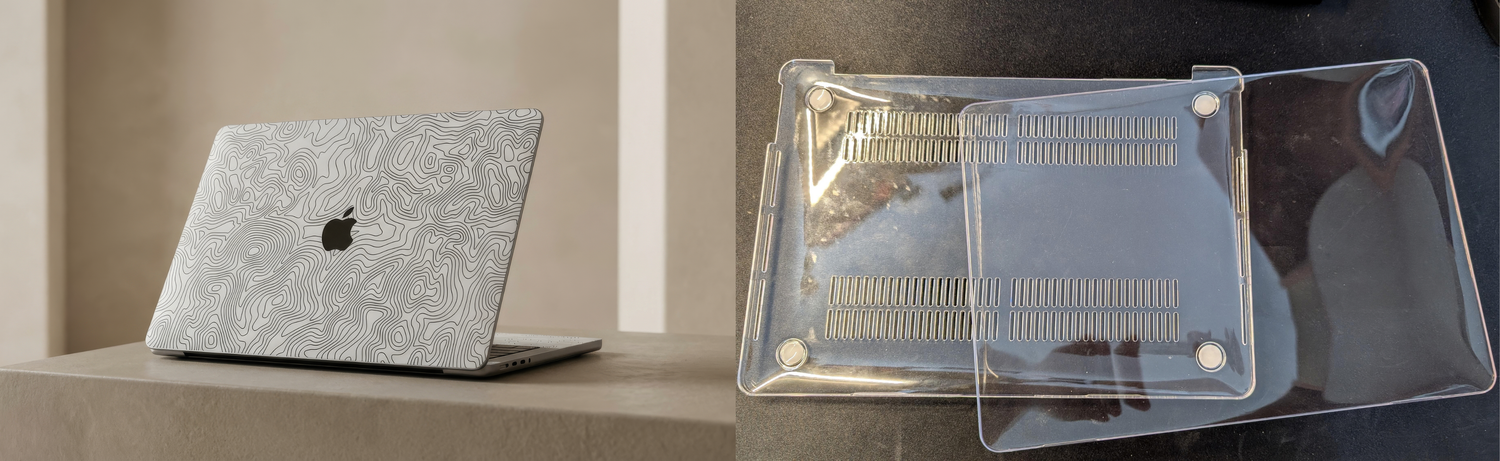
Modern laptops are known for their premium design, powerful performance, and long lifespan. For many users, a laptop is more than just a device, it’s a daily work companion that moves between home, office, and travel.
If you use your laptop daily for work, travel, coding, editing, or studying, it constantly faces risks like:
- Surface scratches
- Friction from backpacks
- Dust buildup
- Palm rest wear
- Minor scuffs from desks
Over time, this can reduce the appearance and resale value of your laptop.
That’s why many users search for solutions like laptop skins, laptop cases, or laptop sleeves. But which option actually protects your laptop better?
Laptop Skin vs Laptop Case
What’s the Difference?
A laptop case is typically a rigid plastic shell that snaps onto the device. While it adds an extra outer layer, it also increases the laptop’s thickness and weight. Over time, cases can trap dust between the shell and the laptop surface, which may lead to micro-scratches. During heavy tasks such as editing, coding, or multitasking, this can increase internal temperatures and affect long-term performance and battery health.

Why Laptop Skins are better
A laptop skin, on the other hand, is an ultra-thin protective layer designed to protect the surface of the laptop from scratches, scuffs, and daily wear. Because skins are precision-cut and extremely thin, they do not change the laptop’s size, weight, or cooling performance. They also help maintain the original design while improving grip during everyday use.
However, when it comes to complete protection, skins and sleeves actually work best together, a laptop skin protects your device from everyday scratches and surface wear, while a laptop sleeve protects your laptop during travel from pressure, bumps, and friction inside bags. This combination gives you the best of both worlds
Why Hard Laptop Cases can cause problems
Hard shell and Clear cases don’t damage laptops immediately, but long-term use can lead to issues. Dust trapped between the case and the body may cause scratches. The added weight can also put stress on hinges.
-
Extra weight on laptop's hinge
Laptop lids are engineered with precise hinge balance. A hard plastic case adds extra weight to the display lid, which can gradually strain hinges.
-
Heating Issues
One common concern is laptop overheating with hard cases. Most modern laptops release heat through the body of the laptop itself or provided air vents. A hard shell case can act like thermal insulation, trapping heat and restricting airflow.
-
Difficult to remove
There are a few cases where the hard shell case gets stuck on the Macbook. The case is hard to remove and can cause scratches and can also damage the screen of the Macbook. One Reddit user said:
"The upper part of it seems to be stuck and there is no way I am able to get it out."

-r/macbookpro
A few other redditors commented about similar issues they faced on their own Macbook.
The Smart Way to Protect: Laptop Skins
Even with careful handling, daily wear is hard to avoid. A laptop skin adds a thin protective layer that guards against scratches, scuffs, and surface damage without adding bulk or affecting heat dissipation.
Unlike bulky cases, skins will:
- Protecting against scratches and scuffs
- Preserving the original laptop design
- Improving grip while using the device
- Maintaining resale value
- Avoiding heat trapping issues
Practical Tips to Extend Your Laptop’s Life
A few smart habits can make a big difference in keeping your laptop looking and performing like new:
-
Use a Laptop Sleeve for Travel
When carrying your laptop, always use a padded sleeve. It protects against pressure, friction, dust, and accidental bumps during daily commuting or travel.
This sleeve from Capes is a good example of Protection and functionality.
-
Avoid Heavy Hard Cases
Hard shell cases may seem protective, but they can trap heat and add extra weight to the display lid. Since laptops are designed to manage heat through their body and vents, minimal external layering helps maintain optimal performance.
-
Keep the Surface Clean
Regularly wipe your laptop with a microfiber cloth to remove dust, fingerprints, and oils. This helps preserve the finish and prevents long-term wear.
-
-
Use a Laptop Skin
The best protection from scratches and scuffs is a Laptop Skin. Skins not only protect your laptop but can also enhance the look of your laptop. Here's a Premium Laptop skin by Capes that uses materials like 3M which are the best in terms of Quality and long term protection.
-
Use a Laptop Skin
How to choose the perfect Laptop Skin
There are plenty of Brands that sell Laptop Skins, but not all of them are of good quality.
Capes India Offers a Premium collection of Laptop Skins that are Imported from France, USA and Japan. Capes offers skins that don't leave any glue reside and have air release channels to eliminate any air bubbles.
A Laptop Skin should be thin. Capes India's Laptop Skins are only 0.2mm thin which adds no bulk to the laptop and does not affect the natural cooling of your laptop
Here's a discount code for Capes India which you can use on their website: capesB10
Frequently Asked Questions
Q1. Are laptop skins safe for laptops?
Yes. High-quality laptop skins are ultra-thin and do not affect cooling, airflow, or hinge balance.
Q2. Do laptop cases cause overheating?
Some hard shell cases can trap heat and reduce airflow. Laptop skins do not affect cooling.
Q3. Are laptop skins better than laptop cases?
For everyday protection, laptop skins are often better because they provide scratch protection without adding bulk or affecting heat dissipation.
Q4. Can laptop skins be removed easily?
Yes. Premium skins use residue-free adhesive and can be removed without damaging the laptop surface.
Q5. Do laptop skins protect against scratches?
Yes. Laptop skins act as a protective layer that prevents scratches, scuffs, and surface wear.
Q6. Do laptop skins leave residue?
No. High-quality laptop skins remove cleanly without leaving sticky residue.
Q7. How long do laptop skins last?
Most laptop skins last 1–3 years depending on usage.
Q8. Are laptop skins waterproof?
Laptop skins are water-resistant, meaning they can handle minor spills but are not fully waterproof.
Q9. Do laptop skins protect against dents?
Laptop skins mainly protect against scratches. For protection against impacts or pressure, use a laptop sleeve.

Leave a comment
This site is protected by hCaptcha and the hCaptcha Privacy Policy and Terms of Service apply.